Marking a lead won or lost
How to close out a lead — converting them to a client when you sign, or marking them lost (with a reason) when you don't.
Every lead in your pipeline ends one of two ways: they sign and become a client, or they don't. Closing them out cleanly — instead of letting "nurturing" leads pile up forever — is what keeps your pipeline honest and your follow-up list short.
This article covers all the closeout paths, plus the in-between "proposal sent" state for leads that are mid-decision.
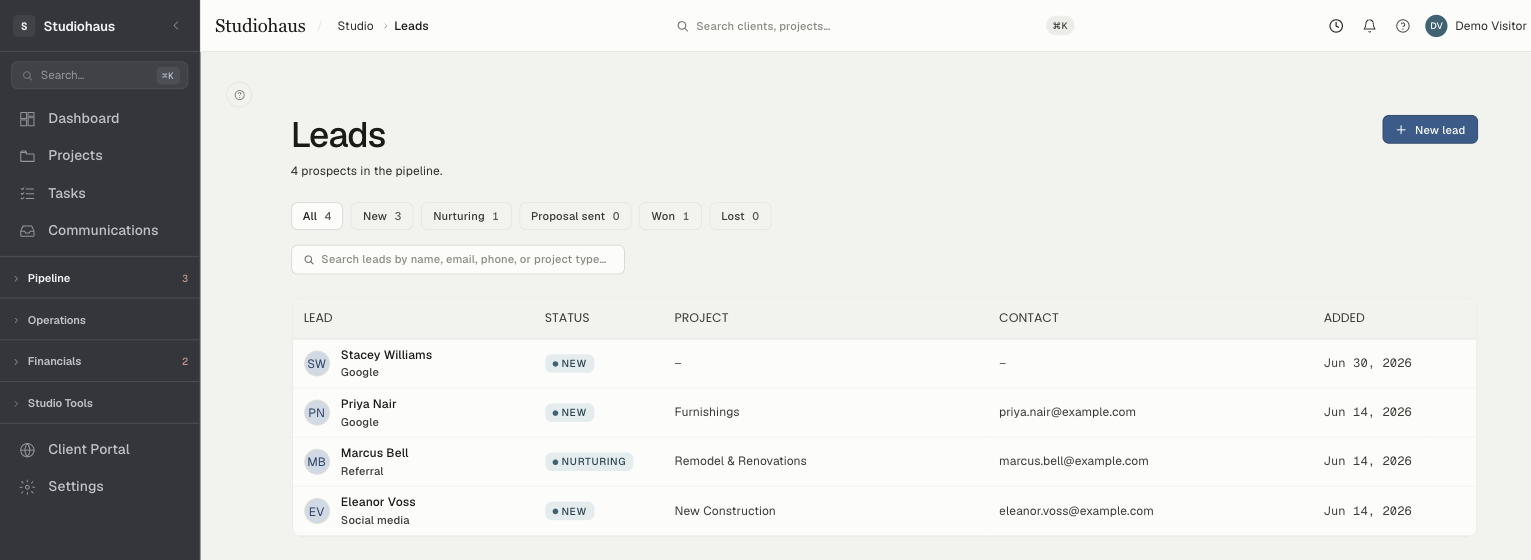
The status flow
A lead moves through these states:
- New — the default when you (or your contact form) capture them. Nothing's happened yet.
- Nurturing — you've engaged: replied to their email, hopped on a discovery call, sent a portfolio. Active conversation.
- Proposal sent — a proposal, quote, or terms is out and you're waiting on a decision. The ball's in their court.
- Won — they signed. They're a client now.
- Lost — they ghosted, picked another firm, ran out of budget, decided to wait. Closed without converting.
The actions card on the right of the lead detail page shows only the buttons that make sense for the current status.
Marking nurturing
Once you've replied or had a real conversation, click Mark as nurturing (it shows up while the lead is still New). It's not required — the app won't nag you — but it feeds the Nurturing tab on the leads page, your shortlist of "active conversations to keep moving."
A good moment to flip it: after the first real back-and-forth. Not the first auto-reply.
Marking proposal sent
When a written proposal, scope, or quote goes out the door, click Mark as proposal sent. It's the cleanest signal in your pipeline that the next move belongs to the client, not you.
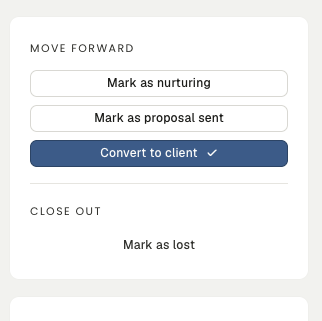
A few practical notes:
- Available from New or Nurturing — you don't have to walk through nurturing first; sometimes a discovery call leads straight to a proposal.
- The lead stays editable, so you can keep logging internal notes about follow-ups, revisions, and the back-and-forth on terms.
- The Proposal sent tab becomes your "awaiting decision" queue. Worth a glance every few days.
- From here the only two moves are Convert to client (they accepted) or Mark as lost (they passed) — both one click away.
There's no button to step a proposal-sent lead back to nurturing. If a deal slows down — they're comparing studios and want a second meeting — just leave it where it is and track the back-and-forth in Internal notes. The status is a signal, not a cage.
Converting to a client (winning)
When the contract is signed (or you're confident it will be), click Convert to client — the blue button. What happens:
- A new client record is created, carrying the lead's name, email, phone, and project address straight over.
- The lead's status flips to Won with a timestamp.
- The lead stays in your history, linked to the new client — its detail page shows "Converted to client [name]" with an Open client → link.
- You land on the new client's profile.
Won leads stay searchable under the Won tab if you ever need the original conversation.
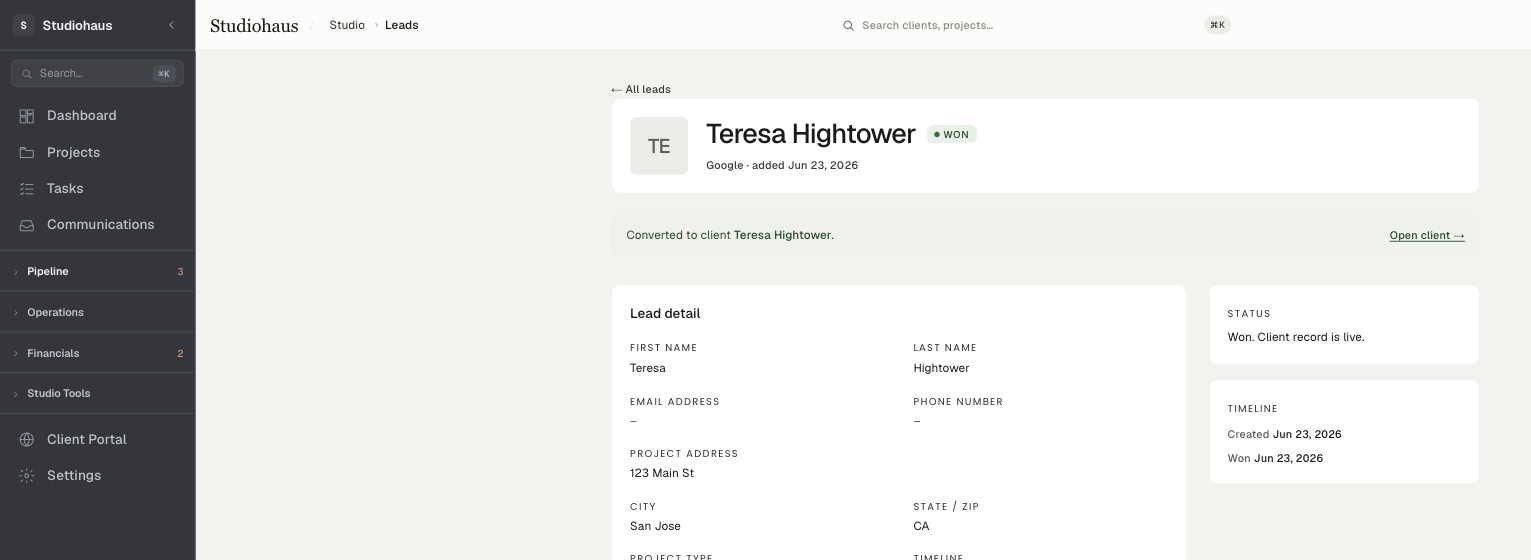
One rule worth holding to: don't hand-create a client and abandon the lead. Always convert. Otherwise you orphan the conversation history and break the thread from inbound to signed work.
Marking lost
For a lead that won't convert — at any stage — click Mark as lost. The button expands to reveal an optional reason field.
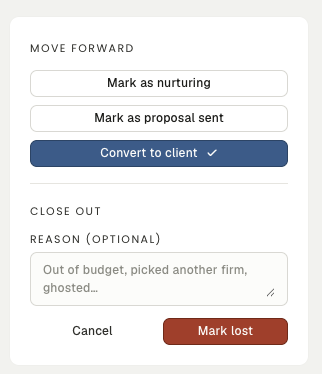
The reason is optional but worth it. A short note — "out of budget," "chose a vendor closer to them," "ghosted after the second call" — turns your lost list into a cheap, honest record of why work slips away. Patterns show up over a quarter.
After marking lost:
- The status changes to Lost.
- Your reason, if you wrote one, is stored and shown on the lead's detail page.
- The lead leaves the New, Nurturing, and Proposal sent tabs and is filed under Lost. (It still shows under All, which lists everything except won.)
- A Re-open as nurturing button appears, in case they come back.
Re-opening a lost lead
If a lost lead resurfaces — a fresh referral, a budget that freed up — open them from the Lost tab and click Re-open as nurturing. The status flips back to nurturing; the lost reason stays on the record as history.
(There's no "re-open as proposal sent." If they're back and ready for a fresh quote, re-open to nurturing first, then Mark as proposal sent when the new proposal goes out.)
Why this matters
Two reasons to stay disciplined about closeouts:
- Pipeline visibility. A leads page full of six-month-old "nurturing" entries is noise. When everything sits at the right status, your New, Nurturing, and Proposal sent tabs read as an accurate to-do list — and the gap between proposal-sent and won shows you where deals actually stall.
- Honest source data. Every lead records where it came from, and that stays visible on the lead and across your list — so your read on which channels bring in real work is grounded in what actually happened, not guesswork.