Organising boards into folders
Filing boards per project, and what Unfiled and Archived are for.
A whole-home project generates a lot of boards: a concept per room, a revision or three per concept, plus the ones that didn't survive the first meeting. Folders keep that from becoming a wall of thumbnails.
Where folders live
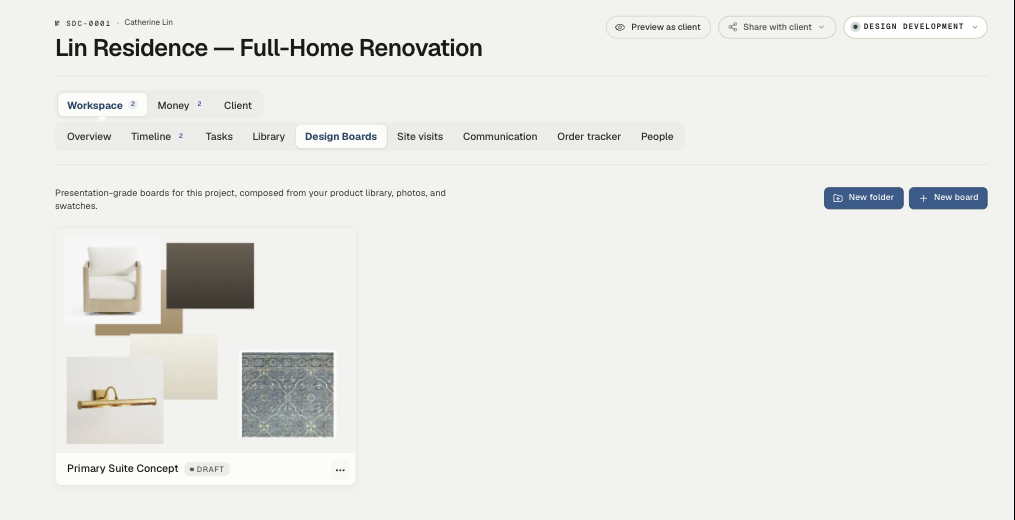
Folders belong to a project. Open the project and go to its Design Boards tab — that's where New folder sits, next to New board.
The studio-wide Design Boards page (in the left nav under Studio Tools) is a flat view across every project — it doesn't group by folder. Think of it as "everything, everywhere"; the project tab is where the filing happens.
Making and using folders
Click New folder, name it, and drop boards into it. Folders render as tiles, the way a Finder window does — a folder is a place you open, not a row in a list.
Names that earn their keep are the ones that match how the project actually runs:
- By room — Primary Suite, Kitchen, Parlor Level
- By stage — Concept, Approved, Superseded
- By audience — For the client, Internal only
Rooms are the usual answer for residential work. Stage-based folders come into their own on long projects where the interesting question is "what's still live?"
Unfiled and Archived
The studio-wide Design Boards page has three tabs:
- Active — everything in play.
- Unfiled — boards not yet in a folder. Treat it as an inbox: a board lands here when you make it in a hurry, and filing it later takes a second.
- Archived — boards you're done with. Archiving keeps a board searchable without it crowding the view. Use it for superseded revisions and concepts the client passed on — they're evidence of the thinking, and worth keeping.
A note on revisions
Revisions (… rev1.1, rev1.2) stay in the same folder as the board they came from, which is what you want: the whole conversation about the primary suite sits in the Primary Suite folder, in order, rather than scattering across the project.
If a folder is getting long, archive the revisions that are settled and keep the current one active.
Related
Related in Design boards
- 01Design boards→Design boards: the basicsWhat a design board is, how to build one from your product library, and how to present it.3 min read· Updated Oct 26, 2026
- 02Design boards→Client approvals on a boardLetting clients approve or decline items on a shared board, and what happens to the board while they decide.3 min read· Updated Aug 22, 2026
- 03Design boards→Sharing a board with your clientPutting a board in the client portal, choosing what they see, and why a shared board locks.3 min read· Updated Aug 22, 2026