Client questionnaires
The built-in intake form, editing it, scoping versions by project type, and sending it to a client.
The questions you ask before a first meeting are the same every time: what rooms, what timeline, what budget, who lives there, what do they already love. A questionnaire asks them once, in writing, branded as your studio — and the answers come back into Studiohaus instead of a thread.
Find it under Studio Tools → Templates → Questionnaires.
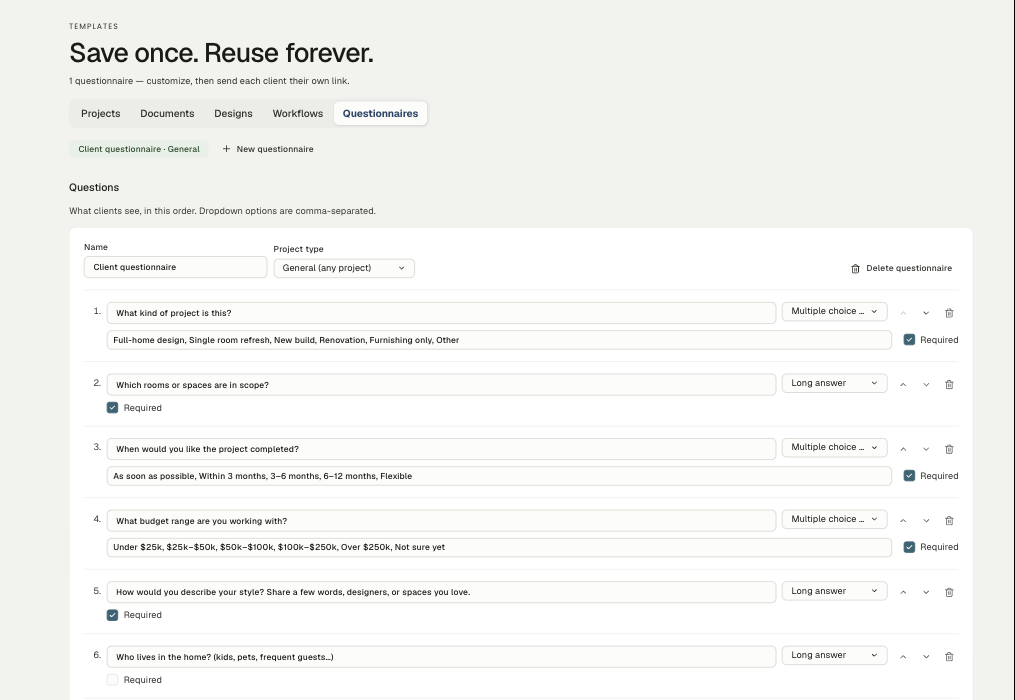
What ships by default
Every studio starts with a built-in intake set of nine questions — project type, rooms in scope, timeline, budget range, style, household, pieces to design around, inspiration links, and an open "anything else". It's a reasonable first-meeting brief as written, so you can send it before touching a thing.
Editing it
Each question has:
- The question itself — plain language. You're writing to a homeowner, not a form.
- An answer type — short answer, long answer, multiple choice, or a multi-select. Choice options are comma-separated on the line below.
- Required or not — required questions block submission. Use them for the handful you genuinely can't proceed without; make the rest optional and more people finish.
Reorder with the arrows, delete with the bin, and add as many as you need. The counsel here is restraint: a fifteen-question form gets abandoned, and the abandoned half is usually the interesting half.
Versions by project type
A questionnaire can be scoped to a project type — the same list your leads use. General (any project) covers everything; add a second questionnaire scoped to New Construction or Hospitality when those jobs need genuinely different questions, and the right one gets used.
Sending it
Send a questionnaire to a client and they get their own link — no login, no account. Their answers come back attached to the send, and you can link a send to a project so the completed intake surfaces on that project's overview.
Because each send carries a snapshot of the questions as they were at the time, editing your questionnaire later never scrambles answers you already collected. What they saw is what stays recorded.
Getting better answers
- Ask for budget as a range, not a number. Ranges get answered; open boxes get skipped.
- Ask what they want to keep. The inherited chest that isn't going anywhere shapes a room more than any brief.
- Leave the last question open. "Anything else you'd like us to know?" is reliably where the real constraint appears — the dog, the divorce, the deadline nobody mentioned.
Related
Related in Studio tools
- 01Studio tools→Reusable project templatesProject, workflow, document and design templates — what each one saves you.2 min read· Updated Oct 26, 2026
- 02Studio tools→The marketing libraryWhere studio-level files live — logos, guides, photography — and how folders keep them findable.2 min read· Updated Aug 22, 2026
- 03Studio tools→Importing and exporting CSVsBringing an existing product library or client list in from a spreadsheet, and getting your data back out.2 min read· Updated Aug 22, 2026
- 04Studio tools→Cutting out a product imageSilhouetting product photography on a board — the automatic pass, the point tool, and the brush.3 min read· Updated Aug 22, 2026