The marketing library
Where studio-level files live — logos, guides, photography — and how folders keep them findable.
Every studio accumulates the same set of files: the logo in four formats, the welcome guide, the service overview PDF, the photos your photographer delivered, the social tiles someone made in Canva. Marketing is where they live so they aren't scattered across a laptop, a Drive folder, and an email thread.
Find it under Studio Tools → Marketing.
Uploading
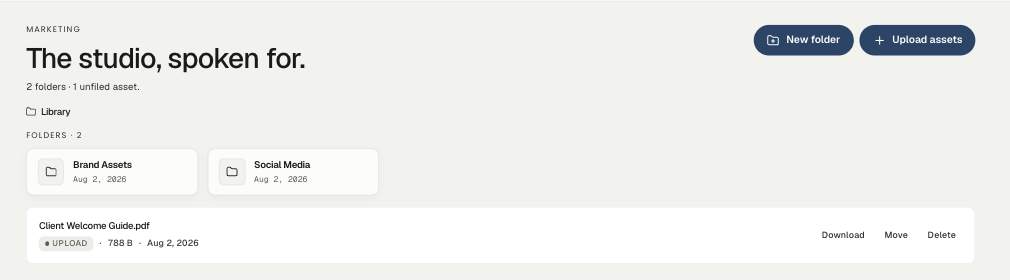
Upload assets takes files, or you can drag them anywhere onto the page — the whole surface is a drop target, and a dropped file saves straight to the library.
Each asset shows its type, size, and when it was added, with Download, Move, and Delete on the row.
Folders
New folder groups assets. The two the demo studio keeps are a reasonable starting pair:
- Brand Assets — logos, wordmarks, colour references, fonts, the one-page brand sheet.
- Social Media — tiles, story templates, the photos you post from.
Anything not yet filed shows as unfiled below the folders, which doubles as the to-sort pile.
Worth adding as you grow: Photography (by project or shoot), Press, and Templates for the documents you hand clients at kickoff.
What belongs here — and what doesn't
Marketing is studio-level: material about you, reusable across every client.
Project deliverables — the floor plan for the Lin residence, the spec sheet for the Marchetti retreat — belong on the project, under its Library tab, where the client portal can reach them. If a client is meant to see a file, it goes on the project; if it's about the studio, it goes here.
A quiet benefit
Having the logo in one findable place is a small thing until the moment a magazine asks for a high-res mark on a deadline, or a new teammate needs the brand kit on day one. The library is boring, and that's rather the point.
Related
Related in Studio tools
- 01Studio tools→Reusable project templatesProject, workflow, document and design templates — what each one saves you.2 min read· Updated Oct 26, 2026
- 02Studio tools→Importing and exporting CSVsBringing an existing product library or client list in from a spreadsheet, and getting your data back out.2 min read· Updated Aug 22, 2026
- 03Studio tools→Cutting out a product imageSilhouetting product photography on a board — the automatic pass, the point tool, and the brush.3 min read· Updated Aug 22, 2026
- 04Studio tools→The product clipperInstalling the Chrome extension and clipping products straight from vendor sites into your library.2 min read· Updated Aug 22, 2026