Tracking time
The top-bar timer, manual entries for hours you didn't catch live, and why every entry carries a rate.
Design hours have a way of evaporating: an hour on the phone with a workroom, forty minutes re-specifying a light, a Saturday morning at the stone yard. The time tracker is a clock in the top bar of every page, so logging that hour costs one click from wherever you already are.
Two ways to log
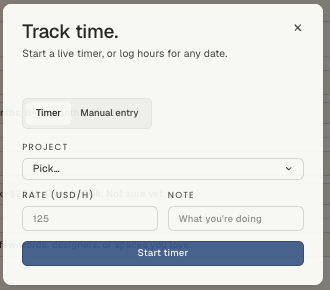
Click the clock icon in the top bar. The panel opens in one of two modes:
Timer — pick the project, set an hourly rate, jot what you're doing, and hit Start timer. The clock runs on the server, not in the tab, so closing the laptop, refreshing, or moving to another page doesn't lose it. Come back later and stop it.
Manual entry — the honest option for time you didn't catch live. Pick a date, enter the hours, and it lands as an entry the same as a timed one. Most studios use this more than the timer, and that's fine.
The project dropdown shows the client's name next to each project, so two similarly named jobs don't get confused.
The rate
Each entry carries the hourly rate you set on it. That's what makes the entry billable later — hours without a rate are a record of effort, not a line on an invoice.
If your rate differs by who's working or what the work is (design time versus project management, principal versus junior), set it per entry rather than trying to keep one studio-wide number honest.
Because it's per project
Every entry links to a project, which is what lets time show up where it's useful:
- On the project, as part of what the job has actually cost you.
- In studio reporting, as the hours behind a month.
- On an invoice, when you bill for time rather than a flat fee.
That link is also why the project picker is required. An untethered hour can't be billed to anyone or measured against anything.
Habits that make the data worth having
- Log at the end of the thing, not the end of the week. Friday reconstruction is fiction.
- Write the note. "Sourcing — three sconce options for the primary bath" tells you something in November; "design" doesn't.
- Track the unglamorous hours too. Vendor chasing and delivery coordination are where fixed-fee projects quietly lose money, and you can't price them better next time if they were never counted.
Related
Related in Studio tools
- 01Studio tools→Reusable project templatesProject, workflow, document and design templates — what each one saves you.2 min read· Updated Oct 26, 2026
- 02Studio tools→The marketing libraryWhere studio-level files live — logos, guides, photography — and how folders keep them findable.2 min read· Updated Aug 22, 2026
- 03Studio tools→Importing and exporting CSVsBringing an existing product library or client list in from a spreadsheet, and getting your data back out.2 min read· Updated Aug 22, 2026
- 04Studio tools→Cutting out a product imageSilhouetting product photography on a board — the automatic pass, the point tool, and the brush.3 min read· Updated Aug 22, 2026